

You designed a post. It looked perfect in Canva. Then you uploaded it, and Instagram cropped your logo off the top, LinkedIn squashed it into a thin strip, and on WhatsApp the text came out blurry.
This happens because every platform crops differently, and most of them do it without warning you.
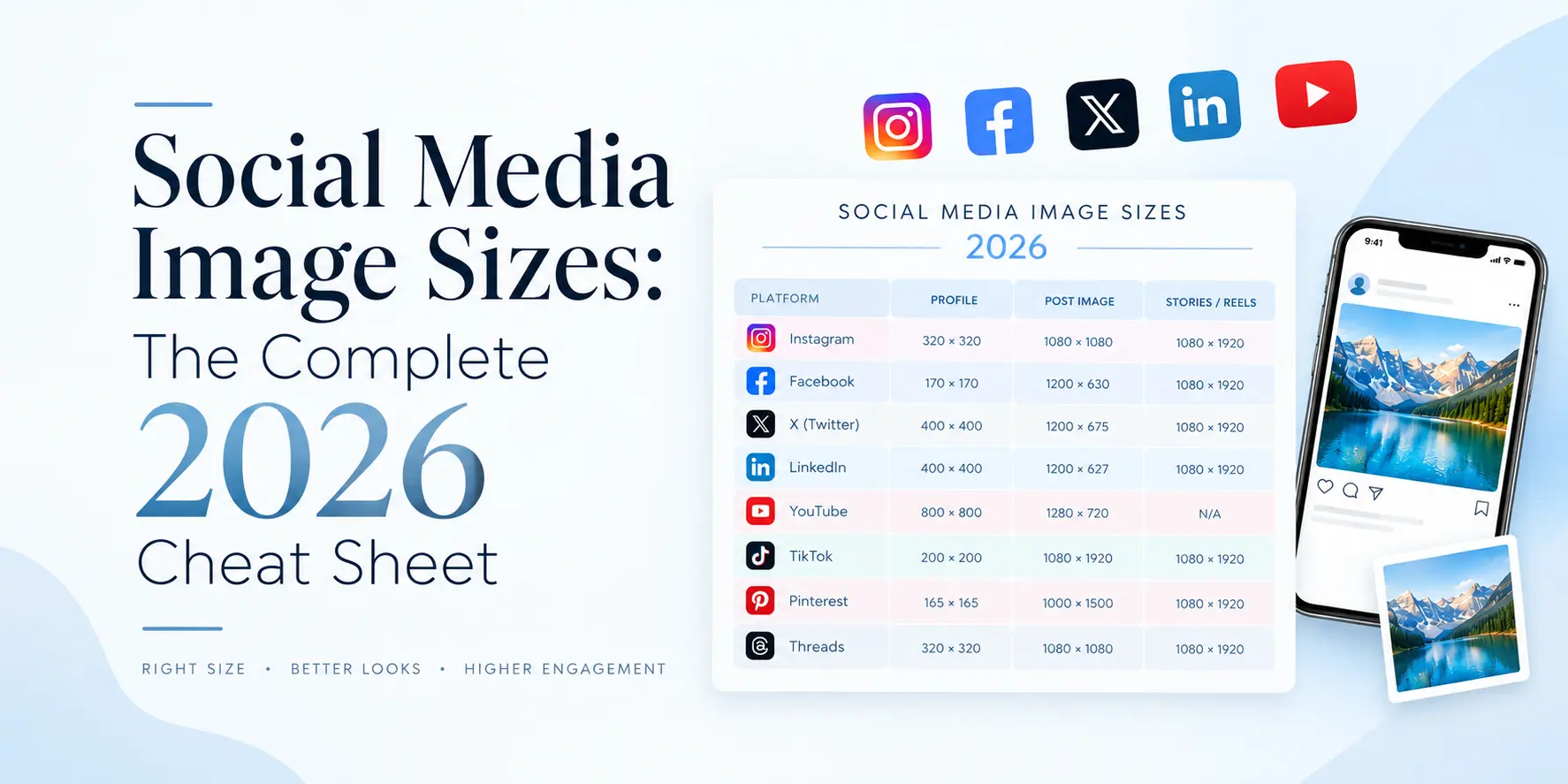
This page lists the exact pixel size for every placement that matters, plus the safe zones that stop your text from getting covered by buttons. Bookmark it. Sizes change once or twice a year, and this was last verified in September 2026.
Start here: three sizes cover most of your work
If you only remember three numbers, remember these.
1080 x 1350 px for feed posts. This 4:5 vertical ratio takes up the most screen space on a phone across Instagram, Facebook, and LinkedIn. A square post shows less. A landscape post shows least.
1080 x 1920 px for anything vertical and full screen. Instagram Stories, Reels, Facebook Stories, WhatsApp Status, YouTube Shorts. All the same 9:16 ratio.
1280 x 720 px for anything landscape. YouTube thumbnails, X posts, link preview images.
Design at these three sizes, and you have covered maybe 80 percent of what a small business posts in a month.
| Placement | Size | Ratio |
| Feed, portrait (best) | 1080 x 1350 px | 4:5 |
| Feed, square | 1080 x 1080 px | 1:1 |
| Feed, landscape | 1080 x 566 px | 1.91:1 |
| Stories | 1080 x 1920 px | 9:16 |
| Reels | 1080 x 1920 px | 9:16 |
| Profile photo | 320 x 320 px | 1:1 |
Portrait beats square. The 4:5 ratio occupies more vertical space in the feed, which means a thumb scrolling past has more time to register it. If you are choosing one feed size to standardise on, choose this.
| Placement | Size | Ratio |
| Feed, portrait | 1080 x 1350 px | 4:5 |
| Feed, square | 1080 x 1080 px | 1:1 |
| Feed, landscape | 1200 x 630 px | 1.91:1 |
| Stories | 1080 x 1920 px | 9:16 |
| Cover photo | 851 x 315 px | 2.7:1 |
| Profile photo | 320 x 320 px | 1:1 |
| Link preview | 1200 x 630 px | 1.91:1 |
Max file size is 8 MB.
The cover photo is the one that catches people’s attention. At 851 x 315 px, it is an awkward ratio, and on mobile, the left and right edges get cut. Keep anything important in the middle two thirds.
| Placement | Size | Ratio |
| Feed, square | 1080 x 1080 px | 1:1 |
| Feed, portrait | 1080 x 1350 px | 4:5 |
| Link preview | 1200 x 627 px | 1.91:1 |
| Personal profile banner | 1584 x 396 px | 4:1 |
| Company page cover | 1128 x 191 px | 5.9:1 |
| Company logo | 400 x 400 px | 1:1 |
Two different cover sizes here, and people mix them up constantly. Your personal profile banner is 1584 x 396. Your company page cover is 1128 x 191. Using one for the other produces a stretched, unprofessional result on the page that prospects actually check.
YouTube
| Placement | Size | Ratio |
| Video thumbnail | 1280 x 720 px | 16:9 |
| Channel banner | 2560 x 1440 px | 16:9 |
| Profile photo | 800 x 800 px | 1:1 |
Thumbnail max file size is 2 MB. Banner max is 6 MB.
The channel banner needs care. You upload at 2560 x 1440, but only the centre 1546 x 423 px is guaranteed visible on every device. Anything outside that centre strip will be cropped on mobile. Put your text and logo inside it.
X (Twitter)
| Placement | Size | Ratio |
| Post, landscape | 1600 x 900 px | 16:9 |
| Post, square | 1080 x 1080 px | 1:1 |
| Header photo | 1500 x 500 px | 3:1 |
| Profile photo | 400 x 400 px | 1:1 |
| Placement | Size | Ratio |
| Standard pin | 1000 x 1500 px | 2:3 |
| Cover photo | 800 x 450 px | 16:9 |
| Profile photo | 165 x 165 px | 1:1 |
Pinterest is stricter than the others. Low resolution pins and images much taller than 1500 px get their distribution limited by the algorithm, so this is one place where the recommended size genuinely is the recommended size.
WhatsApp, the one every other cheat sheet skips
Most international guides leave WhatsApp out entirely. For an Indian business that is the wrong call, because a large share of your customers see your brand on Status before they ever see your Instagram.
| Placement | Size | Ratio |
| Status image | 1080 x 1920 px | 9:16 |
| Status video | 1080 x 1920 px | 9:16 |
| Profile photo | 1080 x 1080 px | 1:1 |
| Chat image | 1080 x 1080 px | 1:1 |
Status safe zone is 1080 x 1420 px. Keep text inside that.
Status video is capped at 30 seconds per update, and file size at 16 MB.
One tip worth more than the rest of this section: WhatsApp compresses images hard. If you are sending a catalogue page, a price list or anything with small text, send it as a document rather than as a photo. The document route skips compression and your text stays readable. Most businesses send a compressed, unreadable JPEG and wonder why nobody responds.
Safe zones, or why your text keeps getting covered
Dimensions are only half the job. The other half is knowing where the platform will put its own buttons on top of your design.
Instagram and Facebook Stories: keep the top 250 px and bottom 250 px clear. Your profile bubble sits at the top, the reply bar and share icons at the bottom. Text placed there is readable in your design file and covered on a real phone.
Instagram Reels: the right side is worse. Like, comment, share and audio icons stack down the right edge, and the caption runs along the bottom. Keep your right margin clear by about 200 px.
WhatsApp Status: the safe area is 1080 x 1420 px, centred.
YouTube banner: centre 1546 x 423 px.
Facebook cover: the middle two thirds is the only part reliably visible across desktop and mobile.
The practical version of all this: put a rectangle in your template marking the safe zone, keep it on a locked layer, and never let type cross it.
Design once, adapt three times
Making twelve separate files for one campaign is the main reason social design feels endless. Here is a faster method.
Design your master at 1080 x 1350 px. That is your most detailed version and it works as is for Instagram, Facebook and LinkedIn feeds.
Crop to 1080 x 1080 px for anywhere square is needed. Because you designed vertical first, you are cropping rather than stretching.
Extend the background to 1080 x 1920 px for Stories, Reels and WhatsApp Status. Do not scale the master up. Keep the artwork at its size and add background above and below, which also conveniently gives you your safe zone.
That is three files from one design, and they stay visually consistent because they came from the same artwork.
File format and quality
JPG for photographs. Smaller files, and the compression is invisible on photos.
PNG for anything with text, a logo or flat colour. JPG compression creates fuzzy edges around type, which is exactly where it shows most.
MP4 with H.264 for video across every platform listed here.
On resolution, a note that saves a lot of argument. The 72 dpi figure you may have been told does not apply to screens. Pixel dimensions are the only thing that matters online. A 1080 x 1350 image is a 1080 x 1350 image whether the file says 72 dpi or 300. The dpi setting only matters when you print, which is a different conversation covered in our work on packaging and print design.
Common mistakes
Uploading a screenshot.
A screenshot of your own design is lower resolution than the original file. Always export fresh from the source.
One image for every platform.
A LinkedIn banner posted as an Instagram story is a thin strip floating in empty space. It reads as carelessness.
Text too small.
Most people see your post on a phone at roughly 400 px wide. Zoom your design down to that width before approving it. If you cannot read the text, neither can your customer.
Using a website logo on a creative.
Web logos are low resolution by design. Ask for the vector file once and use it forever.
Ignoring the crop preview.
Every platform shows you a crop preview before you post. Almost nobody looks at it.
A note on keeping this current
Platforms update quietly. A size that was right in January can be wrong by December, and nobody sends you an email about it.
The figures above were verified in September 2026 against current platform documentation. If you are reading this much later, check the ratios before a big campaign.
If you would rather not think about any of this, our social media creative design team builds templates sized correctly for every placement, so your team can fill them in without worrying about crops.
Frequently asked questions
What is the best size for a social media post in 2026?
1080 x 1350 px, the 4:5 vertical ratio. It works across Instagram, Facebook and LinkedIn feeds and takes up the most screen space on a phone.
What size should a WhatsApp Status image be?
1080 x 1920 px at a 9:16 ratio, with your content kept inside a safe zone of 1080 x 1420 px. Maximum file size is 16 MB.
Does image size affect reach?
Indirectly on most platforms, and directly on Pinterest, where low-resolution pins have their distribution limited. Elsewhere the effect comes through engagement, because a badly cropped post gets scrolled past.
JPG or PNG for social media?
PNG when the image contains text or a logo. JPG for photographs. PNG keeps type edges sharp, which is where JPG compression is most visible.
Do I need a different design for every platform?
No. Design one master at 1080 x 1350, then crop to square and extend to vertical. Three files cover nearly everything.
How often do these sizes change?
Once or twice a year, usually in small ways. The 1080 px width has been stable for a long time. Ratios shift more often than widths do.